# 1. Universal Design for Learning: An in Depth Review
Throughout our third class we spent a large portion of our time discussing UDL and its impact on today's classrooms. We were able to develop a better understanding of how it began, what it is, the steps taken by educational leaders to bring it to the forfront, the relationship it has to assistive technology and various other topics surrounding it. I was quite eager and enthusiastic to learn more about UDL because this is the hot topic in the field of teaching at the moment. My own school principal had recently sent me the Novak videos and information the week before our class. It was very refreshing to be learning about a set of principles that I will actually be using in my classroom in the near future. I enjoyed this discussion a lot because I want to learn as much as I can about UDL so I can share what I have learned with my colleagues at school.
The following are some of the UDL resources and activities shared with us during class three:
* UDL Journey Powerpoint
This was a wonderful way to learn about the journey that this movement has made since its conception.
There definitely has been a lot of hard work done by educators and many others to push this form of curriculum into the mainstream.
I liked how it showed respect and appreciation for the previous ways but states that there was something missing.
I believe this perfectly describes today's curriculum because I feel exactly the same way.
Even though there are dedicated and hardworking teachers and specialists who are doing everything they can with the resources available we are still not reaching a vast amount of students in our school system.
"traditional curricula is what has the disability"

It outlines everything you need to know about UDL with videos, charts, activities, resources, research, texthelp, etc. Its also a great tool for remote learning. I became very familiar with this website as I worked on my R&W for google assignment.
The following is a video on the cast website that tells all about the UDL philosophy. Also attached are the UDL guidelines that can be found in more detail on the cast website.


This was a group activity we did during class. Our challenge was to host a dinner party for 30 - 40 guests who had different kinds of dietary needs, ie. allergies, vegetarian, Paleo diets, Keto diets, etc. We had to collaborate on what we might serve to meet all the needs of our guests. This was an excellent activity to illustrate what a teacher must do in the classroom to meet all the needs of their students. My group planned a variety of individual meals for each dietary concern and this took a great deal of time to do. At the end of this activity we were able to see that providing a buffet would have been more affective and much easier to plan. Guests could then choose what they wanted/needed as opposed to us doing the decision making for them. This was an excellent way to show how UDL should be used in a classroom of students who have different needs. It was also a good way to show how UDL is not like the Differentiated Instruction (DI) that we are all famialiar with. This type of learning is less teacher led and more student led. When students are given a selection of tools or resources to choose from they can all have equal opportunities to learn. This also makes it easier on the teacher when planning.
A typical classroom today can look like the following:

The following is a video of Katie Novak - a UDL expert talking about the dinner party analogy.
Please note: Katie Novak has many videos on youtube. She has also written articles for the cast organization and is a leading expert in the UDL Field.
Some other UDL sites to visit:
http://udlssrsb.ednet.ns.ca/
http://udlssrsb.ednet.ns.ca/udl-placemat-of-apps.html
http://mrmillett.weebly.com/
#2. Read and Write for Google
During class three we also revisited and focused on the read and write toolbars. Read and Write for Google is definitely one of the best tools for reading and writing that I have ever seen. It is a perfect UDL tool that can be matched to help every student. The following video is a brief explanation of read and write for google.
group assignment. Its one of those things where you just have to try it out for yourself. I can think of so many students I have taught in the past who could have benefitted from using this amazing tool. I really look forward to using it with my future students!
Read and Write for Google has so many features. Some of these features are:
* It is available in English and French and can read text aloud
* It allows for translations of words into other languages (French, Spanish, and Portuguese).
* It allows student to use dictation instead of writing.
* It can explain text using dictionary and picture dictionary.
* It can give word suggestions when using word prediction.
* It works with Google docs, PDF files, and ePubs.
* Most importantly, it allows students to become independent and helps build confidence.
Some of the students who could benefit include:
* students with LDs
* language disorders
* attention problems (ADHD)
* organization difficulties
* speech problems
* reluctant readers
* reluctant writers
* visually impaired
* cognitive delays
* ESL
* fine motor or handwriting difficulties
* physically impaired
* comprehension problems
* auditory learners
Helpful Videos: http://bit.ly/RWGoogleVideos
Tech Support Questions: http://support.texthelp.com
# 3. Apps
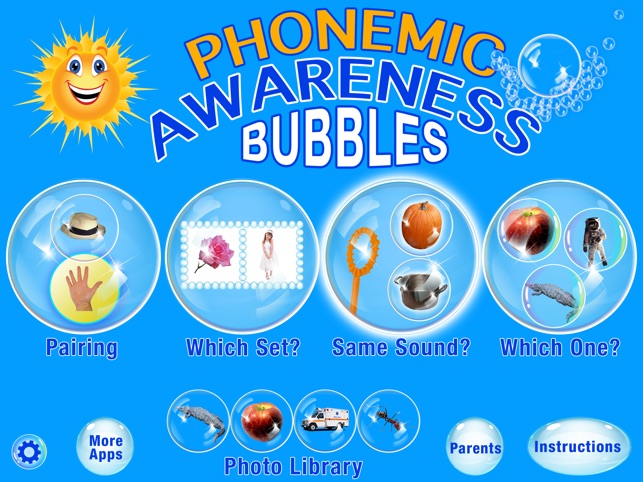
Phonemic Awareness Bubbles
The purpose of this app is to help build foundational reading skills for a child.
This app helps a child develop their ability to listen for and discern sounds at the beginnings of words.
This is a wonderful reading remediation app.
Speech Tutor
This app combines content from 4 of the best selling apps in the industry. The material has been fine-tuned and combined so that everything can be accessed easily without the need to use multiple apps for students with different needs. There are dozens of videos that “dive inside” the mouth to show tongue placement for articulation and so many other activities and resources.

Immersive Reader
This is a free tool that uses techniques to improve reading for people regardless of their age or ability. It can help improve comprehension and encourages independent reading. Its simple and free to use.
This is a great compensatory reading tool.
Keeble
Keeble works in two ways - making it easier for you to type, and speeding up your typing. Visually, it’s highly customizable - from colors to a wide range of fonts, including a dyslexia font. It’s also designed to respond in ways which help you reduce typos and slipups– selecting keys on release and speaking as you type for example. The predictive text feature offers suggestions based on what you’re typing. This not only saves you keystrokes - it can reduce typing effort by up to 60%.

Iris
A software which makes Monitors healthy for the eyes. Many students can suffer from computer eye strain or irritation and this is a free blue light filter which can help to correct those problems.

Cowriter
This is a google chrome extension.
It has word prediction that is grammar smart.
It is inventive and spelling aware.
It's Speech recognition allows you to speak while it writes for you.


This is a quote that I came across that I just love!
We as educators must follow this way of thinking!
We as educators must follow this way of thinking!


Great post, Julie! I found the CAST website to be very useful and informative too. You also provided lots of apps that I can't wait to try!
ReplyDeleteGreat comments Julie.
ReplyDeleteI too am looking forward to learning and embracing UDL especially as our district embraces the Responsive Teaching and Learning framework. So many great changes for the educational system. I hope we get the chance to share our journeys.
Absolutely Awesome Post Julie!! You certainly covered a lot of valuable points in your reflection. It's amazing how reading everyone's post is a learning experience in itself. It's right that we learn something new everyday and that just like students, we too can learn from each other!! Great post Julie!!
ReplyDeleteGreat post Julie, very informative and detailed. You have highlighted all of the main points! So many great apps and new resources to explore as we move forward with this knowledge in our careers:)
ReplyDelete